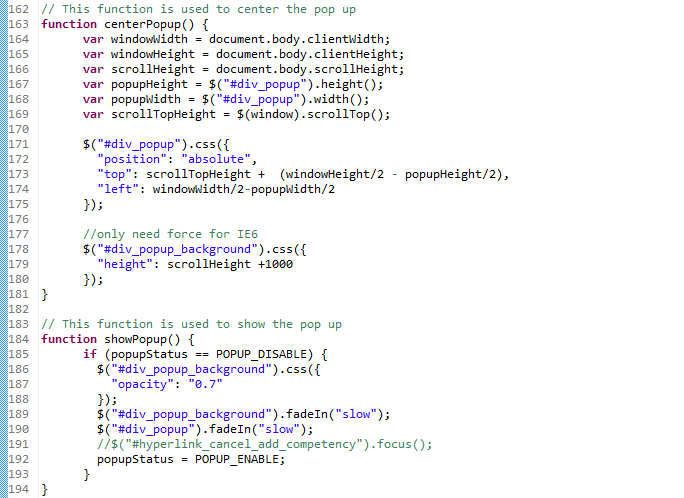
The following screen shot shows how to center a <DIV> pop up in the center of page and black out the background.

History of my code and thoughts
The following screen shot shows how to center a <DIV> pop up in the center of page and black out the background.
The following example shows adding “option” to “selelct” element using JQuery
$("#id").append(
          $("<option></option>").attr("value", '0').text('Please Select')
         ).hide().show();
Note that .hide().show() is a trick that used to refresh the select box cause not all browser refresh select automatically after adding new option.
Following is a sample of making Ajax call and parsing return XML data using JQuery
$.post(url + '/admin/jq?a=6&id=101' , function(data) {

          // Parse data to XML object
          xmlDoc = $.parseXML(data);

          $(xmlDoc).find('targetLevel').each(function(){
                    alert($(this).text());
           });

});
Defining CSS is definitely the proper way to tackle this issue, such as:
<style type="text/css">
a:link { color: #0000ff; }
a:visited { color: #00ff00; }
a:hover { color: #ff0000; }
a:active { color: #ff00ff; }
</style>
But if you just want to have a quick ad hoc solution, javacript come in handy:
<a style="color: black;" onmouseover="this.style.color='blue'"
onmouseout="this.style.color='black'">change color</a>
A CDATA section allows you to mark a section of text as literal so that it will not be parsed for tags and symbols, but will instead be considered just a string of characters. E.g. if you want to put HTML in an XML document, but you don’t want it parsed, you can embed it in a CDATA section.
<?xml version='1.0' encoding='UTF-8'?> <data>
<![CDATA[
  <html>
   ....
  </html>
]]>
</data> Denis Duan